# Zones

The export of IfcZones from Revit can be managed through shared parameters assigned to room objects.

The Revit parameter for zone classification is “ZoneClassificationCode”. The syntax is the same as for [multiple classifications](https://autodesk.ifc-manual.com/revit/classifications/multiple-classifications):&#x20;

![](file:///Users/trishshurtz/Library/Group%20Containers/UBF8T346G9.Office/TemporaryItems/msohtmlclip/clip_image001.jpg)ZoneClassificationCode:                         \[ZoneClassificationName]Code:Title

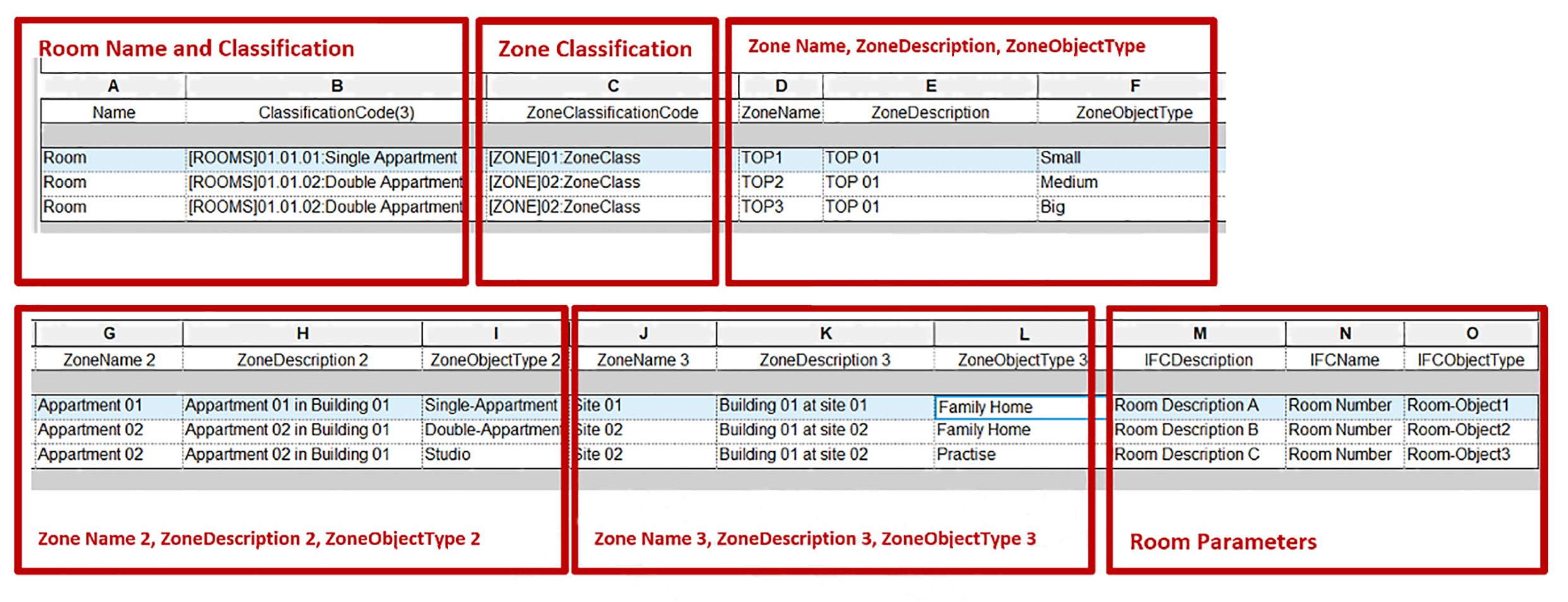
<figure><img src="https://2715261634-files.gitbook.io/~/files/v0/b/gitbook-x-prod.appspot.com/o/spaces%2FprbMwk21uTZaZrhwExiJ%2Fuploads%2F0STy8P1JuUspUlPfsaS4%2F62%20Further%20Uses%20cases%20and%20tips.png?alt=media&#x26;token=c317a69f-1add-4c06-a3ba-51a69d11e5a3" alt=""><figcaption><p>Zone-related parameters allow more detailed pieces of information on zones.</p></figcaption></figure>

*Room Name* and *ClassificationCode* are assigned to the rooms in IFC.

The *ZoneClassificationCode* is the classification parameter for zones.

*ZoneName, ZoneDescription* and *ZoneObjectType* define zones objects . \
&#x20;

<figure><img src="https://2715261634-files.gitbook.io/~/files/v0/b/gitbook-x-prod.appspot.com/o/spaces%2FprbMwk21uTZaZrhwExiJ%2Fuploads%2FikxqXtCmzc7km0dCPair%2F63%20Further%20Uses%20cases%20and%20tips.png?alt=media&#x26;token=83980d21-2440-43df-b149-b802c08fdaf2" alt=""><figcaption><p>Zones and properties in IFC viewed in BIM Vision</p></figcaption></figure>

<figure><img src="https://2715261634-files.gitbook.io/~/files/v0/b/gitbook-x-prod.appspot.com/o/spaces%2FprbMwk21uTZaZrhwExiJ%2Fuploads%2Fj28HMVUkkJGuj3BsIs82%2F64%20Further%20Uses%20cases%20and%20tips.png?alt=media&#x26;token=ad36281f-c9f9-4b7f-93ef-6da767e6e3df" alt=""><figcaption><p>IfcName  is mapped to Number, IfcDescription is mapped to IFCSpace – Description.</p></figcaption></figure>
